Whether you’re using ARGUS Developer for development appraisals, ARGUS Enterprise for investment modelling, KEL for valuations or Forbury for cash flow analysis, Pantera can help you bring your existing work across.
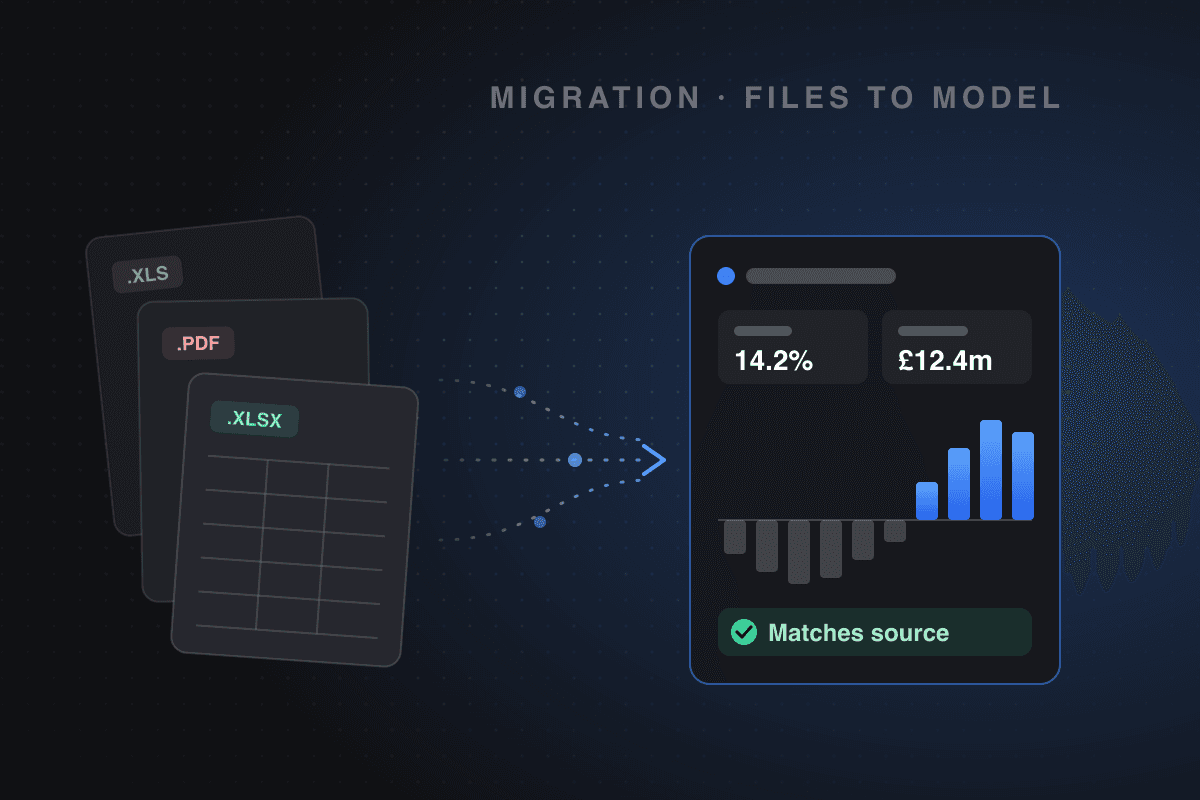
Rather than manually rebuilding models, you can upload your existing files and use Pantera’s AI to extract the relevant information, populate the model and apply your assumptions.
For individual properties, the process can be as simple as uploading a couple of documents. For businesses with hundreds of existing models, we can help manage the migration in bulk.
This guide explains how to get started with each platform, what information you can bring across and how to check the results.
How migration works
Pantera uses AI to read your existing property documents and modelling outputs, extracting information such as tenancy details, rental assumptions, development costs, finance terms and cash flow timings.
That information is then used to populate a new Pantera model, which you can review and adjust as required.
You can also provide additional instructions in plain English. For example, you might ask Pantera to retain the existing rental assumptions but apply a different exit yield, introduce a six-month void on expiry or solve for a target development profit.
Your original files remain available for reference, allowing you to compare the new model against the source information.
Before getting started
There are a few things worth checking before uploading your files.
- File formats: Pantera accepts Excel (.xlsx and .xlsm), CSV, PDF, Word documents and emails. If you’re working with an older .xls export, save it as .xlsx first.
- Upload limits: You can attach up to 10 files per message, with a maximum size of 25 MB per file.
- Organisation: We recommend creating a dedicated folder in Pantera for your imported models. This makes it easier to review the migration before incorporating the models into your existing workflows.
Migrating from ARGUS Developer
ARGUS Developer is widely used for development appraisals, particularly residual land valuations and schemes involving multiple phases, funding arrangements and construction programmes.
Pantera’s development modelling functionality covers many of the same requirements, including residual land calculations, phased construction costs, development finance and sensitivity analysis.
What you’ll need
We recommend exporting two reports from ARGUS Developer:
- Appraisal summary (PDF). This provides the underlying assumptions, including land costs, construction costs, professional fees, finance, sales values and development returns.
- Development cash flow (Excel). The cash flow provides the timing of expenditure and receipts, allowing Pantera to replicate the development programme and associated cash flows.
For more complicated schemes, particularly those involving multiple phases, it’s worth including the phase-level cash flows as well.
Creating your development appraisal
- From the Pantera homepage, select Development and attach your ARGUS appraisal summary and cash flow.
- You can then give Pantera a brief instruction explaining what you’d like it to do. For example:
“These are the ARGUS Developer appraisal and cash flow for Rex Building. Create a development appraisal using the existing assumptions and phasing, and calculate the residual land value based on a 20% profit on cost.”
- Pantera will extract the information and populate a development model, which you can then open and review.
- Once the model has been created, you can make changes directly or use AI chat to update the assumptions.
For example, you could ask Pantera to increase construction costs by 5%, extend the development programme by three months or adjust the financing assumptions.
How ARGUS Developer compares with Pantera
| ARGUS Developer | Pantera |
|---|---|
| Residual land valuation | Land value calculated against a target profit, IRR or yield on cost |
| Development phases | Phased construction programmes and exit timings |
| Construction cost distribution | S-curve, straight-line, front-loaded, back-loaded and custom spend profiles |
| Construction and professional fees | Detailed development cost categories and fee assumptions |
| S106 and CIL | Dedicated planning obligation cost lines |
| Development finance | Notional finance and structured debt facilities |
| Equity structures | Equity waterfalls, preferred returns and promote structures |
| Residential or commercial sales | Unit sales, pre-sales, deposits and investment exits |
| Sensitivity analysis | Two-way sensitivity tables |
| Reporting | Excel exports, PDF reports and shareable models |
Migrating from ARGUS Enterprise
ARGUS Enterprise is commonly used for investment cash flow modelling, asset valuations and portfolio analysis.
Depending on how you’re using ARGUS, you can bring this information into Pantera as an acquisition model, a traditional valuation or a portfolio of properties.
What you’ll need
The most useful starting point is an ARGUS Enterprise Report Package containing:
Exporting these reports to Excel gives Pantera the information needed to reconstruct the property assumptions and associated cash flows.
For portfolios, ARGUS Report Packages can also include multiple properties, making them useful for larger migrations.
Creating an investment model
- From the Pantera homepage, select Acquisition and attach the exported ARGUS reports.
- You can then ask Pantera to create an acquisition model using the existing property assumptions. For example:
“Create a five-year acquisition model for 1 King Street using the attached ARGUS Enterprise reports. Retain the existing tenancy assumptions and market leasing assumptions.”
- Pantera will use the reports to populate the asset information, including tenancy details, rent reviews, lease expiries and leasing assumptions, alongside the investment cash flow.
- You can then review the outputs and adjust the assumptions using the model editor or AI chat.
Migrating traditional valuations
- If you’re using ARGUS Enterprise for traditional investment valuations, select Valuation instead.
- Upload the relevant valuation summary and tenancy information, and Pantera can create a valuation using the appropriate methodology.
Pantera supports common UK commercial property valuation approaches, including term and reversion, hardcore and top-slice, equivalent yield and net initial yield.
For valuers, this means existing property and tenancy information can be used without manually rebuilding the valuation from the beginning.
Moving an ARGUS portfolio
If you’re migrating multiple properties, you can upload a consolidated Report Package and ask Pantera to create a separate model for each asset.
These can be organised into folders and combined into a portfolio, allowing you to analyse individual assets alongside the wider portfolio.
For larger migrations, our team can help structure the process and reconcile the results against your existing ARGUS outputs.
How ARGUS Enterprise compares with Pantera
| ARGUS Enterprise | Pantera |
|---|---|
| Property and tenancy schedules | Assets, units and lease information |
| Rent reviews and lease events | Fixed, percentage, indexed and market rent reviews, lease breaks and expiries |
| Market Leasing Assumptions | Reusable assumption profiles for voids, renewals, incentives and leasing costs |
| Capital expenditure | CapEx assumptions with configurable spend profiles |
| Property operating expenses | Operating costs, ground rents and asset management fees |
| Acquisition and disposal assumptions | Purchase costs, exit assumptions and purchaser’s costs |
| Debt modelling | Debt facilities, refinancing, fees and covenant analysis |
| DCF analysis | Geared and ungeared cash flows, IRR and NPV |
| Traditional valuations | Term and reversion, hardcore and equivalent yield valuations |
| Sensitivity analysis | Two-way sensitivity tables |
| Portfolio analysis | Combined portfolio models and comparative reporting |
Migrating from KEL
KEL offers several modelling products, each designed for a different purpose.
The migration process therefore depends on whether you’re using KEL for development appraisals or investment valuations.
The main products are:
| KEL product | Typical use | Pantera equivalent |
|---|---|---|
| Delta / DeltaLite / DeltaPlus | Development appraisals and residual land valuations | Development model |
| Investment Valuer | Single-property investment valuations | Traditional valuation or acquisition model |
| Sigma / SigmaPlus | Property and portfolio valuations | Traditional valuations |
| DRC | Depreciated replacement cost valuations | Not currently supported |
KEL Delta: Development appraisals
For KEL Delta users, the process is similar to migrating from ARGUS Developer.
- We recommend exporting the appraisal report as a PDF and the development cash flow as an Excel spreadsheet. The appraisal report provides the development assumptions, while the cash flow helps Pantera understand the timing of costs, financing and receipts.
- From the Pantera homepage, select Development and attach both files.
- You can then ask Pantera to recreate the appraisal using the existing assumptions. For example:
“Create a development appraisal for Mill Lane using the attached KEL Delta report and cash flow. Retain the existing development costs and programme, and solve for a 20% profit on cost.”
- Once the appraisal has been created, you can compare the results with KEL and make any necessary adjustments.
Pantera also allows you to explore alternative assumptions, such as changes to build costs, sales values, finance rates or development timings, without having to rebuild the appraisal.
KEL Investment Valuer: Traditional valuations
- For Investment Valuer users, export the existing valuation report as a PDF. For multi-let properties, we also recommend including an Excel tenancy schedule or the relevant rental information.
- Select Valuation in Pantera and attach the documents.
- Pantera can use the existing assumptions to populate a valuation, including tenancy information, yields, purchaser’s costs and the relevant valuation methodology.
- You can then review the valuation and export the results to PDF or Excel.
KEL Sigma and SigmaPlus: Portfolio valuations
For firms using Sigma or SigmaPlus, migration will often involve a larger number of properties.
- Rather than exporting each valuation individually, we recommend starting with an assumptions export containing the property and unit-level information. This gives Pantera the underlying data required to create valuations across multiple properties.
- For example, you could upload an assumptions export and ask:
“Create a separate valuation for each property in this SigmaPlus export, using the existing rental assumptions, valuation methods and yields.”
For larger portfolios, we recommend splitting the migration into manageable batches so the results can be reviewed as the process progresses.
Our team can also assist with bulk migration where a business has a substantial existing valuation database.
How KEL compares with Pantera
| KEL | Pantera |
|---|---|
| Residual land valuation | Residual land calculations based on target development returns |
| Development cash flows | Monthly development cash flows and configurable spend profiles |
| Development finance | Notional finance and structured debt facilities |
| Term and reversion | Term and reversion valuations |
| Hardcore and layer | Hardcore and top-slice valuations |
| Initial and equivalent yields | Net initial yield and equivalent yield calculations |
| DCF valuations | Acquisition models with discounted cash flows |
| Rent reviews | Fixed, percentage, indexed and market rent reviews |
| Leasehold valuations | Leasehold valuation assumptions |
| Retail zoning | ITZA calculations |
| Sensitivity analysis | Two-way sensitivities and scenario comparisons |
| Valuation reporting | PDF and Excel reports |
Migrating from Forbury
Forbury Datum is commonly used for investment cash flow modelling, particularly across single assets and portfolios.
Because Forbury models are built in Excel, the migration process is relatively straightforward.
You can upload the existing workbook directly into Pantera without needing to export separate reports.
Single-asset models
- For a single-property Datum model, select Acquisition from the Pantera homepage and attach the Excel workbook.
- Pantera can extract the underlying property assumptions, including rental income, lease events, capital expenditure, financing and acquisition and disposal assumptions.
- You can also specify which assumptions you’d like to retain. For example:
“Create an acquisition model for Unit 7 using the attached Forbury Datum workbook. Use the existing tenancy assumptions and five-year cash flow, including the current rental growth and exit yield assumptions.”
- Once the model has been created, you can compare the investment returns against your original Datum workbook.
Portfolio models
Forbury Datum Portfolio users can also upload workbooks containing multiple properties.
Pantera can use the information to create individual asset models, which can then be combined for portfolio-level analysis.
This allows you to retain the ability to review each asset individually while also analysing the combined cash flow and investment performance.
How Forbury compares with Pantera
| Forbury Datum | Pantera |
|---|---|
| Monthly investment cash flows | Monthly cash flow engine with monthly, quarterly and annual reporting |
| Inflation and rental growth | Indexed, fixed and market rent reviews |
| Refurbishment assumptions | CapEx and refurbishment costs with spend profiles |
| Acquisition and disposal yields | Entry and exit yields, including purchaser’s costs |
| House assumptions | Reusable investment assumption profiles |
| Investment valuations | Traditional valuations or hold-period acquisition models |
| Portfolio modelling | Combined asset and portfolio cash flows |
| Sensitivity analysis | Two-way sensitivity analysis |
Migrating an entire portfolio or modelling database
For some businesses, the challenge isn’t moving one or two models. It’s migrating an existing library of development appraisals, investment models or valuations built up over several years.
Pantera supports both individual uploads and larger migrations, with the approach depending on the number of files and the systems you’re moving from.
Individual models
If you only have a handful of models to migrate, you can upload them directly through Pantera’s AI chat.
This is generally the quickest way to get started, particularly if you’re testing the platform against an existing appraisal or valuation.
Portfolios and larger batches
For firms migrating an investment portfolio or a larger set of valuations, it’s often more efficient to use a consolidated export from the existing system.
Examples include ARGUS Enterprise Report Packages, KEL SigmaPlus assumptions exports and Forbury Datum Portfolio workbooks.
Pantera can use these files to create individual property models and organise them into the relevant folders or portfolios.
Full database migrations
If you’re looking to migrate hundreds of models or an established valuation database, our team can assist with the process.
We can work with your existing exports, help map the relevant information into Pantera and review the resulting models against your current system.
This is particularly relevant for valuation teams, investment managers and developers looking to move away from a legacy modelling platform without losing access to their historical work.
Checking your migrated models
Regardless of the system you’re moving from, we recommend comparing the new Pantera models against your original outputs before relying on them.
For investment models, this will typically include capital values, cash flows, IRRs and equity multiples.
For development appraisals, the key comparisons are usually residual land value, development profit, profit on cost and cash flow timing.
For traditional valuations, the focus will be on capital value, rental assumptions, yields and purchaser’s costs.
There may be differences between systems due to the way particular calculations are handled, such as finance compounding, cash flow timing or purchaser’s costs.
These can be reviewed and adjusted within Pantera to ensure the models reflect your intended assumptions.
For larger migrations, we can help with the reconciliation process and identify any material differences that need further investigation.
Ready to move your models to Pantera?
Whether you’re looking to migrate a single development appraisal, an investment portfolio or several years of valuation files, we can help you get started.
You can upload your existing files directly into Pantera or speak to our team about a larger migration.
Get in touch to discuss migrating your existing models to Pantera.